
Finder is the file manager every Mac ships with, and for names, folders, kinds, and dates it is fast and free. It has one hard limit: it searches the labels around a video, never the picture inside it. VidFinder adds the part Finder cannot do – it looks at the footage and lets you search a clip by what it actually shows. This page covers where each one wins.
The Short Answer
Finder searches videos by file name, kind, date, size, and the metadata macOS already extracts, with a Quick Look preview on the space bar. It cannot search by what a clip shows. VidFinder indexes 8 frames per video with an on-device AI model and lets you search the footage by visual meaning. Both run locally on your Mac.
Finder is the right tool when you know the name, the folder, or roughly when a file was made. VidFinder is the right tool when you do not – when the file is called A001_C012.mov and all you remember is that it showed a red jacket. The rest of this page draws the honest line between the two.
What Finder Search Does Well
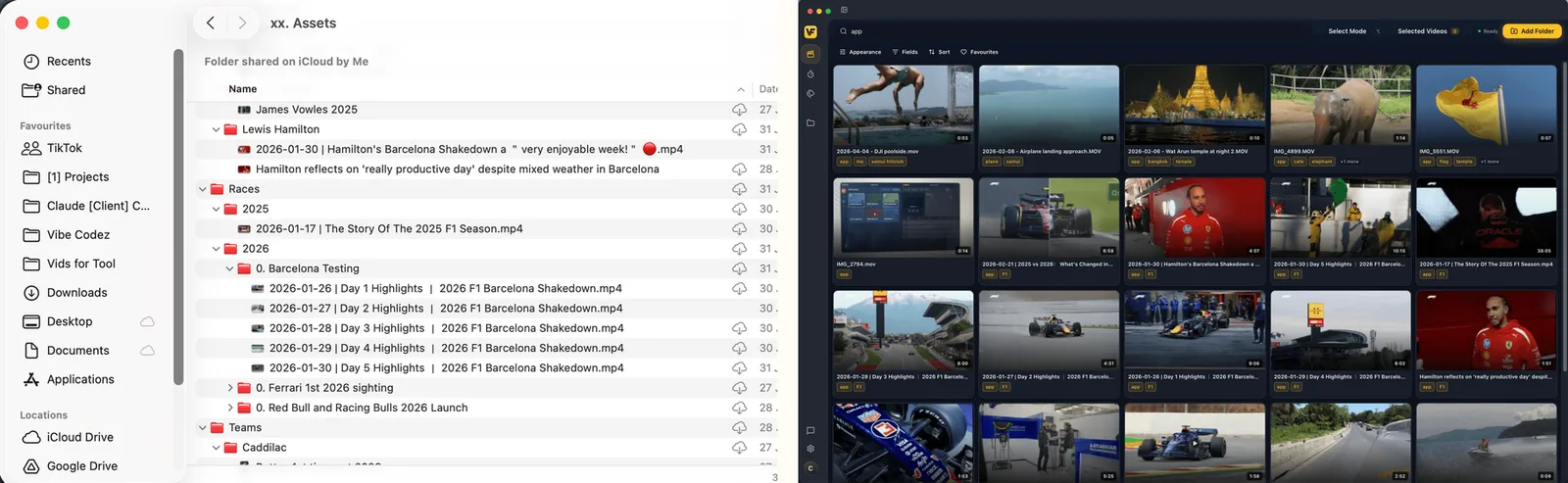
Finder search is fast, free, and already on your Mac. Backed by Spotlight's index, it finds files by name, kind, date created or modified, and size, and it reads the metadata macOS extracts from a video – duration, dimensions, and codec. Finder tags and the Quick Look space-bar preview round it out. For a file you can name, it is hard to beat.
None of that costs anything or needs installing, which matters. If your footage is named well and lives in tidy folders, Finder handles a lot of day-to-day retrieval on its own. You can stack criteria in a search window – Kind is Movie plus Created this week – and Finder narrows the list with AND logic. VidFinder is not trying to replace those habits. It reads the same files Finder does and leaves them exactly where they sit.
What Finder Can't Do: Search by What a Clip Shows
Finder matches the labels around a file – its name, folder, kind, date, and the metadata macOS already pulled. It does not look inside the frame. There is no way to type "person in a red jacket" or "sunset over water" and have Finder rank your clips by what the footage depicts, because Spotlight never analyzed the picture. If it is not in the name or the metadata, Finder cannot reach it.
That is the gap every editor hits. A client asks for "the shot of the coffee being poured." You never renamed the file, it is C010C023.mp4, and it sits in a folder called /Shoots/Day2/. Finder can find it only if one of those labels happens to carry the word "coffee." The footage plainly shows a pour, but Finder has no sense of that – it reads text about the file, not the image. This is the specific job VidFinder was built for.

How VidFinder Searches Inside the Footage
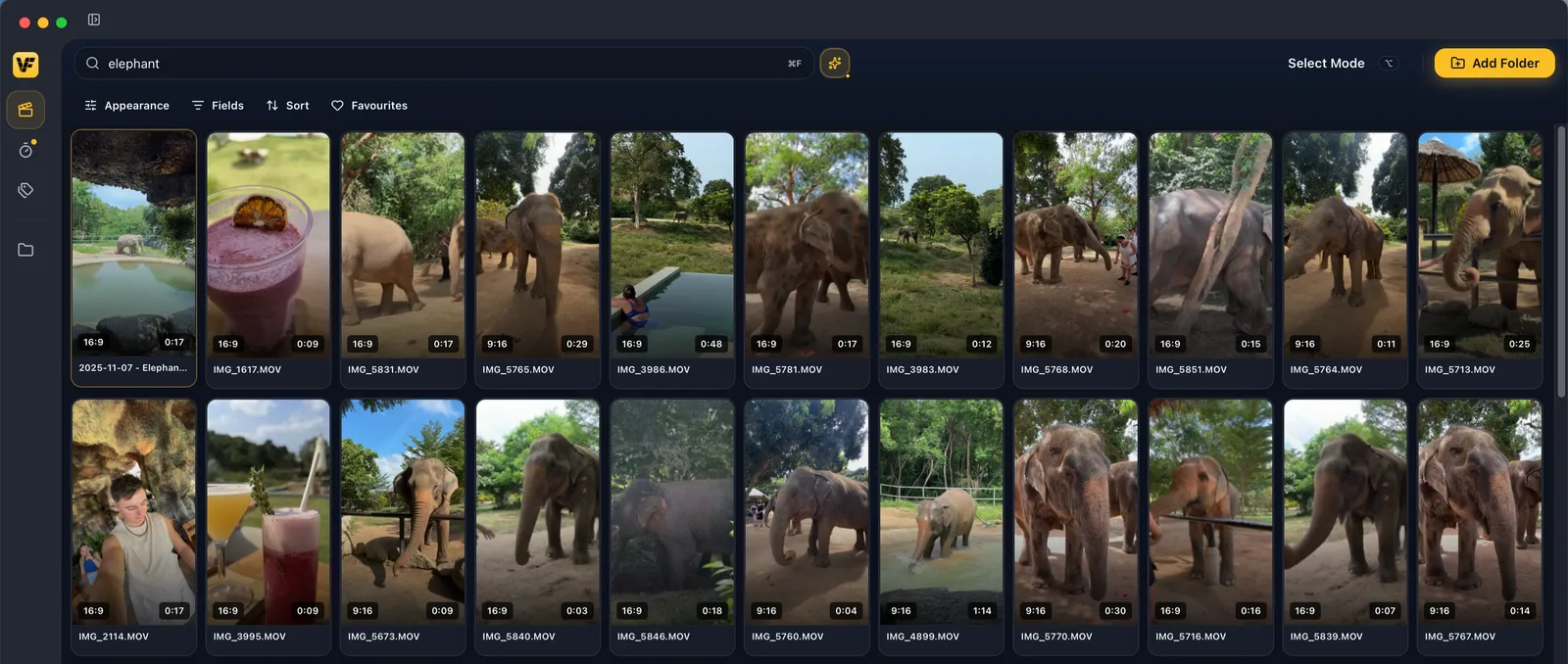
VidFinder is a native macOS app that brings the videos from every hard drive, iCloud and Google Drive folder on your Mac into one visual library – scrub through previews – search by file name, folder name or simply describe what's in the shot. Its Smart Search reads the picture: it samples 8 frames per video and matches them against your words, so you can find a clip with no tags and a camera-gibberish name.
Under the hood, VidFinder runs OpenAI's CLIP ViT-B/32 model (INT8, ONNX) fully on-device and turns each sampled frame into a 512-dimension vector. The 8 frames are spaced evenly from 5% to 84% of each clip's runtime, so a moment two thirds of the way in still counts – not just the thumbnail. Type pouring coffee, and VidFinder ranks clips by how closely the footage matches. You can also stack keyword and visual signals in one bar: file name, folder name, tags, and what the frame shows, together.
Both Run Locally on Your Mac
Neither tool ships your footage to a server. Finder's Spotlight index is local to your Mac by design. VidFinder matches that: all frame sampling, AI analysis, and search happen on your machine, and your videos, frames, and the search index are never uploaded. The one thing VidFinder downloads is the AI model itself, about 149 MB, one time.
For anyone cutting unreleased or confidential footage, that parity matters. Moving from Finder to VidFinder does not add a cloud step or an upload to trust – you gain visual search without giving up the local-only privacy you already had. The vectors are tiny too: 8 frames at 512 dimensions is 16 KB per video, roughly 16 MB for a thousand clips, stored in a local database alongside VidFinder's previews.
Quick Look Previews vs Scrubbable Previews
Finder's space-bar Quick Look shows one clip at a time – you select a file, press space, and it plays. VidFinder generates a small local preview for every video up front, an 8-second scrub clip plus a thumbnail, so you hover across a whole grid and read each clip at a glance instead of opening them one by one. Different jobs: one previews a file, the other previews the library.
The scrub preview is why VidFinder stays useful when a drive is unplugged. Because the previews live in VidFinder's local cache, you can browse, search, select, and favorite clips from an external drive that is not even connected, then plug it in for the final drag into your editor. Finder, by contrast, needs the volume mounted to preview or open the original. VidFinder never edits or moves those originals – it only reads them, so your folders look identical before and after.
When to Use Finder and When to Use VidFinder
Use Finder when you know the name, folder, kind, or date – it is free, instant, and already open. Use VidFinder when you do not: when the file name is camera gibberish, the footage is untagged, or you can only describe what the shot looks like. Finder searches the labels around your video; VidFinder searches the picture inside it. They overlap little and stack well.
Most editors run both. Finder stays the quick jump to a file you can name, and it handles documents, apps, and everything that is not video. VidFinder takes over the footage-retrieval job Finder was never built for – describing a shot, scrubbing a grid, working offline, and pulling clips straight into an editor. VidFinder reads 20 video container formats, from mp4 and mov to mkv, mxf, and m2ts, and indexes them wherever they already live.
| When you… | Use |
|---|---|
| You know the file name | Finder |
| You know the folder, kind, or date | Finder |
| The file name is camera gibberish | VidFinder |
| The footage is untagged | VidFinder |
| You can only describe what the shot looks like | VidFinder |
Frequently Asked Questions
Can Finder search inside a video by what it shows?
No. Finder and Spotlight match a video's file name, kind, date, size, and extracted metadata such as duration and dimensions. They do not analyze the picture, so you cannot search by what the footage depicts. VidFinder adds that visual search by sampling and reading the frames.
Does VidFinder replace Finder?
No. Finder stays the fast, free way to find any file you can name, across documents, apps, and video. VidFinder handles the video-specific job Finder cannot – searching footage by visual meaning, scrubbing previews, and working offline. Most editors use both, and VidFinder reads the same files without moving them.
Is VidFinder's search cloud-based like some AI tools?
No. Like Finder's Spotlight index, VidFinder runs locally. All frame sampling, AI analysis, and search happen on your Mac, and your videos, frames, and index are never uploaded. The only download is the one-time AI model of about 149 MB.
Can VidFinder find spoken words or on-screen text in a clip?
No. Smart Search reads the picture, not the audio, and it does not read on-screen text. It matches what a frame looks like. Finder cannot do this either – its match is the file's name and metadata, not its content.
Do I have to rename or tag my footage first?
No. VidFinder searches by visual meaning out of the box, so an untagged clip with a camera-generated name is still findable by describing the shot. That is the main thing it adds over Finder, which depends on the name, folder, or metadata already carrying your search term.
Does VidFinder change my files the way it indexes them?
No. VidFinder only reads your source files – it never moves, renames, edits, or deletes an original. Its previews and search index live in a separate local cache, so your folders look exactly the same in Finder before and after indexing.
What video formats does VidFinder read?
VidFinder indexes 20 container formats, including mp4, mov, m4v, mkv, avi, webm, mts, m2ts, mxf, and wmv. It pulls only video files from the folders you connect and ignores documents, images, and apps.